Simplify vs Jobright: which one actually submits the application?
Simplify vs Jobright is usually written up as a feature list. We ran both on 19 September 2026 with the same fictional test résumé, for a candidate called Priya Nair, and wrote down what each one did with it: what it parsed, what it added, how far it got into a real form, and what it cost that day.
A disclosure first: we make RoleInbox, which competes with both. So nothing below is a verdict. Each line is something we saw on a stated date, and where we could not see something, the page says so.
| Simplify vs Jobright | Simplify | Jobright |
|---|---|---|
| What it says it is | “A personal AI talent agent for job seekers”: matching, résumé tailoring, a browser extension that fills applications, a tracker. | Matches roles to a résumé, fills employer forms in one click “across major ATS platforms”, tailors a résumé per posting. |
| Parsed profile (19 Sep) | Nothing contradicted the résumé. It kept the account’s name and email, not the résumé’s, and marked all three roles “Full-Time”, which the résumé never says. | Nothing that was not in the résumé. Name, contact details, all three roles and the skills list came through verbatim. |
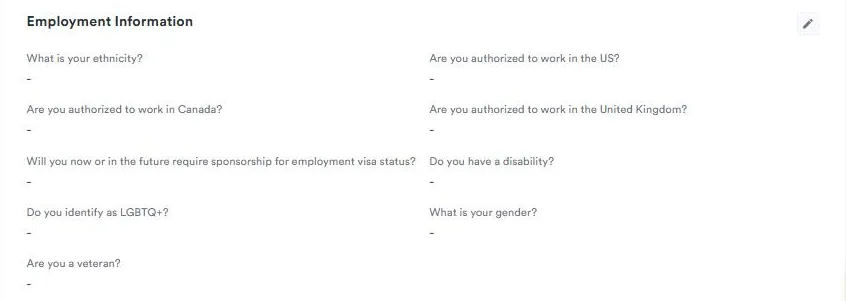
| Demographic fields (19 Sep) | All blank. Nothing guessed. | Empty, with a prompt asking the user to fill them in. |
| Résumé tailoring | A Simplify+ feature; not run on the free account. The free job pane shows “6 out of 13 required keywords found” and a “Tailor my resume” button. | Offered four keywords the résumé does not contain, including Looker. The generated résumé highlighted three skills the résumé does not contain. |
| Filling a real form | Not observed. No Simplify extension UI appeared on the Greenhouse form we loaded. | Easy Apply loaded a Rocket Money form and showed “9/13 required fields filled 69%”. |
| Sending | Its help centre says Autopilot “completes and submits the application” with no review step in between. Paid beta; not run by us. | After Submit, the recording shows “We are applying for you…”, then a pause for an emailed verification code. |
| Price seen 19 Sep | Free tier. Simplify+ $19.99 a week, $39.99 a month, $89.99 for three months (help centre; /pricing returned 404). | Free $0.00. Turbo $17.99 a week, $39.99 a month, $89.99 for three months (in the app; /pricing returned Page Not Found). |
What is the main difference between Simplify and Jobright?
Both read your résumé, match you to postings and help fill employer forms. The difference we saw on 19 September 2026 was in where each one spends its effort.
- Jobright leans on the résumé itself. Before it let our test candidate apply, it scored the résumé against the posting and offered to rewrite it. Its Easy Apply then filled a real employer form inside Jobright.
- Simplify leans on a browser extension and a profile. On the free account, the writing features (résumé tailoring, cover letters, answers to questions) are marked Simplify+. Its help centre is the clearest document either vendor publishes about when an application is sent.
Will either tool submit an application without you pressing send?
Simplify, from its own help centre. Read on 19 September 2026, the Autopilot article says: “Once you choose Autopilot on a job, it completes and submits the application. There’s no step in between where you review it. If you want to check an application before it goes to the company, use Copilot instead.” Autopilot is listed as a beta for paying Simplify+ members. We did not run it: on the free account, the Autopilot page sent us back to the marketing home page.
Jobright, from a screen recording of its flow on the same day. Easy Apply loaded the employer form, filled most of it and showed a Submit button. After Submit was pressed, the screen read “We are applying for you…” and ticked off opening the page, uploading the résumé and filling in details. It then paused for a verification code sent by email. No review screen appeared between Submit and that point.
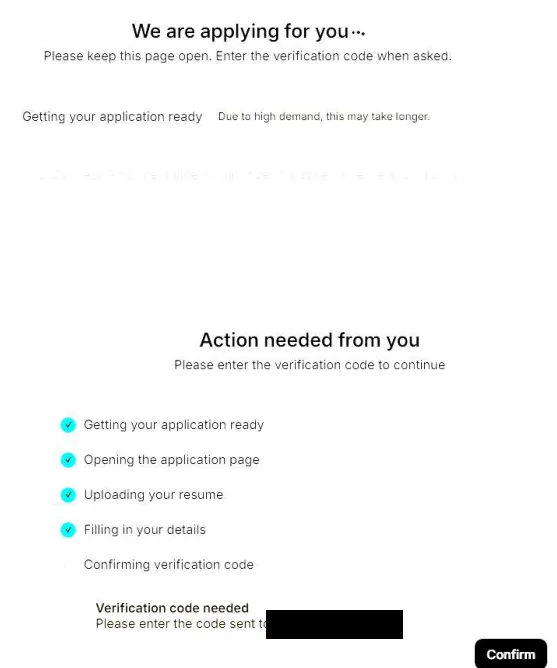
So in both products a person starts the send: choosing Autopilot on a job, or pressing Submit. The recording ends at the code prompt, so whether that application arrived is not recorded. In our separate automated run the same day, a Jobright status box for the same Rocket Money role read “Oops, something went wrong”. We cannot tell whether it was the same attempt.
Jobright also sells an “AI Agent” to “automate your job search”. On the free plan it is listed as “Limited Access”, and its page showed a loading spinner for about 35 seconds and never finished. What it does was not observed.
Which ATS does each one work on — Workday, Greenhouse, Ashby, Lever?
What each one claims, and what we saw:
- Jobright closes its autofill pitch with five logos: Workday, Greenhouse, Ashby, Lever and iCIMS. The form its Easy Apply filled was a Rocket Money posting; which system that form runs on was not recorded.
- Simplify says its extension works on more than 100,000 career sites. Its help centre says Autopilot supports “a specific set of application systems” and does not name them.
We loaded one real Greenhouse form, a junior data analyst role at CareTalk Health, and checked the page for anything either extension had added. There was nothing from Simplify or from Jobright. Neither product was tried on a Workday form.
How much of a form does each one fill?
Jobright: on the Rocket Money form, its own tracker read “9/13 required fields filled 69%” before Submit. The form included questions about US work authorization and sponsorship.
Simplify: not observed. The Greenhouse form we used has more than 30 inputs, from name and address through five yes/no skill questions to the voluntary equal-employment block. No Simplify surface reached it, so there is no count to give.
What did each one add that the résumé does not say?
At the profile, very little. We checked each parsed profile against the résumé field by field on 19 September 2026. Jobright’s held nothing that was not in the résumé. Simplify’s held nothing that contradicted it, but it marked all three jobs “Full-Time” (the résumé gives no employment type), used category labels such as “Data Analysis” as skills, and kept the account’s own name and email in place of the résumé’s. Both dropped the CFA line, the projects, the awards and the languages.
At the résumé, Jobright offered more. Pressing “Apply with autofill” on an Apartment List analytics role opened a box before anything was sent. It scored the résumé 4.5, “Poor”, and listed four missing skills: Marketing Measurement, Experimentation And A/B Testing, Looker and Analytical Communication. None of the four is in the résumé. The green button said “Fix My Resume Now”; the other choice, “Apply Without Customizing”, was a smaller text link.
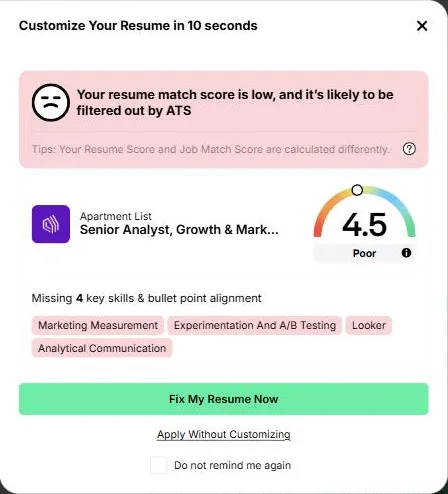
“Fix My Resume Now” opens a three-step flow: See Your Difference, Align Your Resume, and Review Your New Resume. So there is a review step before the new résumé is used.
A screen recording of the same flow that day, for a Rocket Money data science role, shows what came out. The score went from 2.5 to 7.0, and the summary of changes included “Add 10 missing skills”. The new résumé highlights “statistical modeling”, “data engineering” and “Scripting languages”. None of those three phrases appears anywhere in the original résumé. Two of them sit inside the candidate’s own job bullets, where they read as things she did.
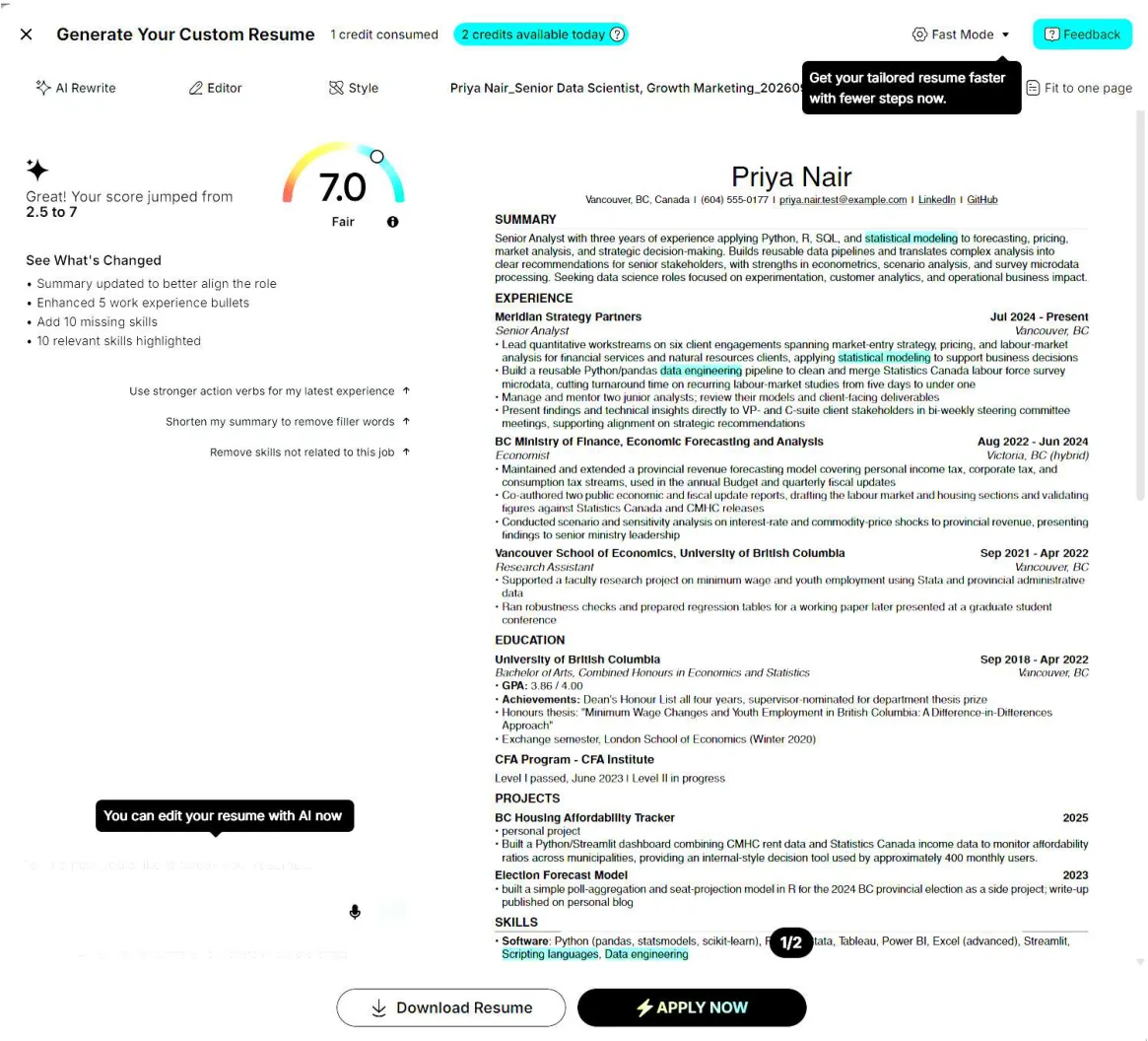
Simplify’s tailoring is a Simplify+ feature and was not run, so there is nothing to compare it with.
What does each do with a question your résumé does not answer?
Real forms ask things a résumé cannot answer. The Greenhouse form we used asked about US work authorization, AWS experience, start date, referrals and text-message consent. The test résumé answers none of them.
One layer before the form, both products behaved the same way on 19 September 2026. Neither guessed at the demographic fields on the profile. Simplify left every one, work authorization included, as a dash. Jobright left its Equal Employment section empty and asked the user to complete the profile.
At the form itself, only Simplify states a rule, in its help centre: when Autopilot is not confident of an answer, “it fails the application rather than guess”, uses no credit, and leaves you to finish it with Copilot. We did not see that happen. What Jobright writes into such a question was not observed.
Is Jobright.ai legit, and is it good?
“Legit” is a verdict, and we sell a competing product, so here is what we saw instead, on 19 September 2026.
- It is a working product. Its parsed profile was the most faithful of the two: nothing added, nothing changed.
- Its Easy Apply loaded a real employer’s form, filled 9 of 13 required fields and began submitting.
- The free plan is usable. It is metered in daily credits (2 résumés, 4 autofills, 2 cover letters) rather than walled off.
- Its match percentages moved between reloads with no profile change: Rocket Money read 79, 77, 78, then 77% within ten minutes.
- Its résumé tool added skills the test résumé does not contain (see above).
- A status box saying “Oops, something went wrong” stayed on screen across every page load.
Is Simplify worth using?
What the free account showed on 19 September 2026:
- Job matching works without paying. Onboarding counted 2,957 matched jobs paying over $100k, and each job shows which of its keywords the résumé already has.
- The writing tools are paid: résumé tailoring, cover letters, answers to application questions, and Autopilot.
- The résumé parser dropped whole sections (certifications, projects, awards, languages) and kept the account’s name instead of the résumé’s.
- Onboarding shows “5x job offer rate” and “2M+ job seekers, 500k+ offers landed”. No method or source is shown for either.
- Its help centre says plainly which mode sends without review, and which one to use if you want to check.
Simplify vs Jobright: what does each cost, and what is free?
Neither vendor has a working public pricing page. On 19 September 2026 simplify.jobs/pricing returned 404 and jobright.ai/pricing returned Page Not Found. The numbers came from Simplify’s help centre and from Jobright’s in-app upgrade box.
- Simplify+: $19.99 for one week, $39.99 for one month, $89.99 for three months. Every plan has the same features; they renew automatically unless cancelled. Job matching and the tracker are not on the paid list.
- Jobright Turbo: $17.99 a week, $39.99 a month, $89.99 for three months. The free plan is $0.00 with daily credits. Turbo-only on the list: live coach sessions, Easy Apply and a hidden-jobs filter. Easy Apply buttons still showed on job cards on our free account.
The month and three-month prices are the same for both. A weekly plan kept for a month costs roughly twice the monthly one. Jobright’s own box prints the weekly plan as $71.96 a month.
Jobright vs Simplify: which one fits which kind of job search?
By what you want, not by rank:
- You want to see what exists before paying. Both free tiers do matching. Jobright’s also lets you try a few autofills and résumés a day.
- You want the form filled for you. Jobright’s Easy Apply is the one we saw fill and start sending a real form. Simplify’s extension did not appear in our test, so we cannot say.
- You want to know exactly when something is sent. Simplify documents it in writing: Copilot lets you check, Autopilot does not.
- You want every line of the résumé to be true. Whichever you use, read the tailored version against your own before you accept it. On Jobright that is the “Review Your New Resume” step.
Where RoleInbox sits
We make RoleInbox, so this is the one place it is described. It is supervised auto-apply: nothing is sent until you have seen it. Its answers come from facts you have approved. It fills Greenhouse and Ashby forms.
What this page is based on
Both products were run on 19 September 2026 on free accounts, with a fictional test résumé for “Priya Nair”. No payment details were entered. Each parsed profile was checked against the résumé field by field. A screen recording of each product’s own flow, made the same day, adds the Jobright generated résumé and the Easy Apply submission; on 24 September 2026 the generated résumé was checked against the original, word by word, for the three highlighted skills.
Some things could not be seen. Neither browser extension appeared on the Greenhouse form, so neither product’s autofill there is recorded. Simplify’s Autopilot and paid writing tools were not run. Jobright’s AI Agent never finished loading. Neither product was tried on Workday. Where this page quotes Simplify on what Autopilot does, it is quoting Simplify’s help centre, not something we watched.
Vendor pages read on 19 September 2026: